Exploring the Power of Custom Hooks in React and Next.js
Custom hooks have become a cornerstone of modern React and Next.js development. They empower developers to encapsulate and reuse logic, fostering cleaner, more maintainable code. In this deep dive, we’ll journey through the world of custom hooks, exploring their benefits and practical applications.
The Essence of Custom Hooks:
At their core, custom hooks are JavaScript functions that utilize React’s built-in hooks to manage stateful logic. They’re reusable blocks of code that can be shared across different components, enhancing code organization and reusability.
Creating a Custom Hook:
For a function to be recognized as custom hooks, it must follow a naming convention similar to other react hooks like ‘useState’. The ‘use’ prefix makes to function to be recognized and treated as a custom hook.
Please note that what follows after the ‘use’ prefix is totally up to the you but using something that is descriptive enough is highly advised, names like useTours, useCategories, useData, useStudent among others.
The Rules of React Hooks:
React Hooks come with a few essential rules that ensure consistency and prevent unexpected behavior, these also apply to all custom hooks;
-
Hooks Should Only Be Used at the Top Level: Hooks should never be nested within loops, conditions, or nested functions. They should always be called at the top level of your function component or custom hook. This ensures that React maintains the same order of hooks on every render.
-
Hooks Should Only Be Called from React Functions: You should only use hooks within React components or custom hooks. Using them in regular JavaScript functions or classes will lead to errors. Don’t call Hooks from regular JavaScript functions.
-
Custom Hooks Should Start with “use”: To distinguish custom hooks from regular functions, they should always start with the “use” prefix. This naming convention helps developers understand that a function is a hook.
-
Hooks Should Always Be Called in the Same Order: The order in which you call hooks matters. They should be called in the same order on every render. React relies on the order of hooks to associate stateful values with the corresponding hooks.
Best Practices;
Prefix Convention: Custom hooks often start with “use” (e.g., useTourCategories) to distinguish them from regular functions. Single Responsibility: Keep custom hooks focused on one task, making them more versatile. Dependency Injection: If your custom hook depends on external services, pass those services as arguments rather than relying on imports. Benefits of Custom Hooks
Reusability: Custom hooks encourage code reuse, reducing duplication and promoting the “DRY” (Don’t Repeat Yourself) principle. Abstraction: They abstract complex logic, making components cleaner and easier to read. Separation of Concerns: Logic is separated from the presentation layer, promoting better code organization and maintainability. Testing: Isolated hooks are simpler to test, ensuring your application remains robust. Using Custom Hooks in React and Next.js:
To use a custom hook, simply import it into your functional component and call it at the top level like as shown below;
import useTourCategories from './useTourCategories';

function TourCategories() {
  const { categories, loading } = useTourCategories();

  if (loading) {
    return <LoadingSpinner />;
  }

  return (
    <div>
      {categories.map((category) => (
        <CategoryCard key={category.id} category={category} />
      ))}
    </div>
  );
}
Use of a custom hook in Next Js 13
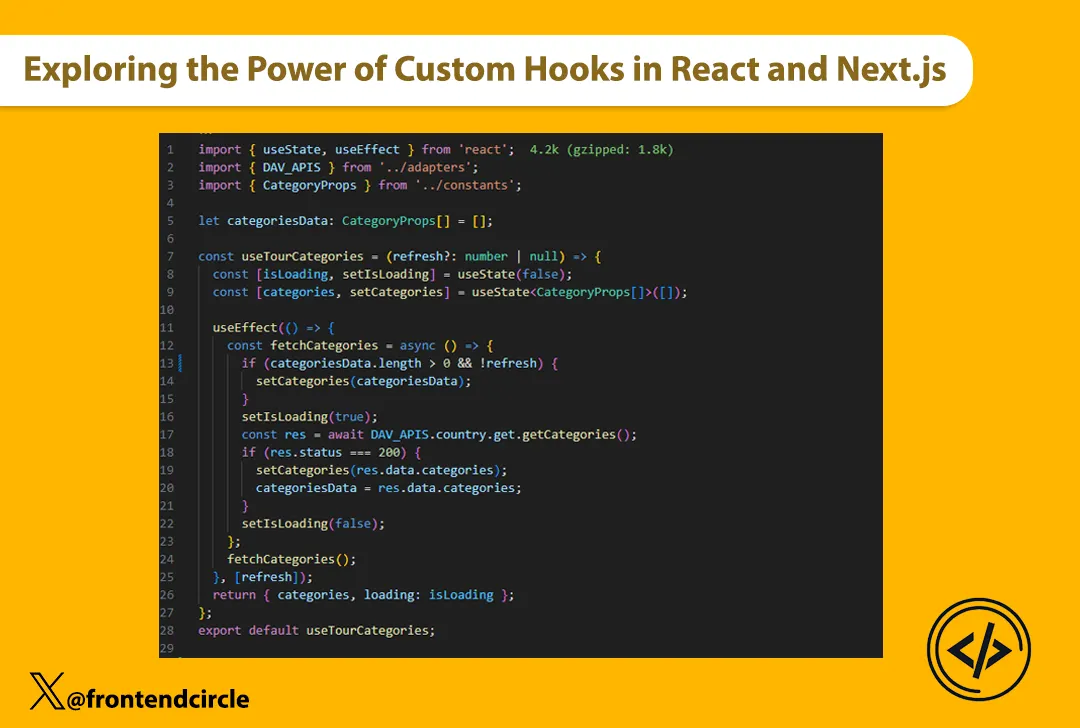
When used in next js 13, you need to add ‘use client’ at the top of the hook since we are using useState and useEffect hooks which only work on the client side, same applies to the component in which the custom hook is used. See the image below for a better understanding of this.
'use client';

import { useState, useEffect } from 'react';
import { DAV_APIS } from '@/adapters';
import { CategoryProps } from '@/constants';

let categoriesData: CategoryProps[] = [];

const useTourCategories = (refresh?: number | null) => {
  const [isLoading, setIsLoading] = useState(false);
  const [categories, setCategories] = useState<CategoryProps[]>([]);

  useEffect(() => {
    const fetchCategories = async () => {
      if (categoriesData.length > 0 && !refresh) {
        setCategories(categoriesData);
      }

      setIsLoading(true);
      const res = await DAV_APIS.country.get.getCategories();

      if (res.status === 200) {
        setCategories(res.data.categories);
        categoriesData = res.data.categories;
      }

      setIsLoading(false);
    };

    fetchCategories();
  }, [refresh]);

  return { categories, loading: isLoading };
};

export default useTourCategories;
Conclusion:
Custom hooks are a powerful tool in your React and Next.js arsenal. They streamline logic, encourage reusability, and lead to cleaner code. By mastering custom hooks, you’re on your way to becoming a more efficient and effective frontend developer. Happy coding!
Did you find this helpful?